OBD2 Car Scanner - ELM Torque
CardsAuto & Vehicles
4.5173.00 Reviews
- Version
- 2.1.0
- Installs
- 1.00M
- Age Rating
- Everyone
Screenshots
Our Review of OBD2 Car Scanner - ELM Torque
 Analysis by Appyee
When a warning light appears just before a commute, my first question is usually not “How do I fix the car?” but “What is the car trying to tell me?” That is where OBD2 Car Scanner - ELM Torque can help: it turns an OBD2 adapter and a phone into a way to inspect diagnostic information before deciding what to do next. I see it as a useful first step, not a substitute for a mechanic or a guarantee that a problem is simple.
Start with the right expectations
This is an Auto & Vehicles app from Cards, and it is free to install. It has a 4.4 average from around 5,800 ratings, with more than 500,000 installs, so it has found an audience among drivers who want a closer look at their cars. Its Everyone age rating makes the audience broad, though the information it presents can still be technical. The current version is 2.1.0, and it runs on Android 8.0 or later.
The key thing to sort out before opening the app is the hardware. You need a compatible OBD2 adapter, such as an ELM327 Bluetooth adapter, and a vehicle with an OBD2 system. The app itself cannot read the car from across the driveway without that connection. If you already have an adapter, the setup is a practical next step; if not, include the adapter’s compatibility and quality in your decision rather than assuming every device sold under the same name behaves alike.
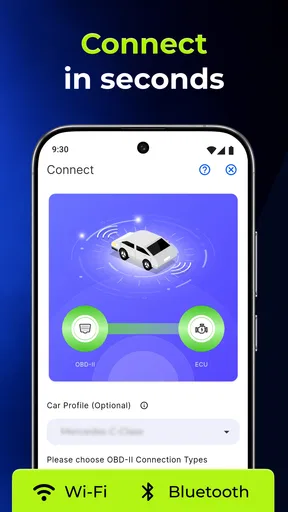
I would also treat the first connection as a short setup task, not something to attempt while driving. Locate the vehicle’s OBD2 port, plug in the adapter, pair it with the phone over Bluetooth, and then connect in the app with the car stationary. If pairing fails, checking the phone’s Bluetooth connection and adapter fit before assuming the car has a fault can save time. Some adapters may be unreliable, so a dropped connection does not automatically mean the vehicle’s diagnostic system is at fault.
Get to Know Your Car Inside Out
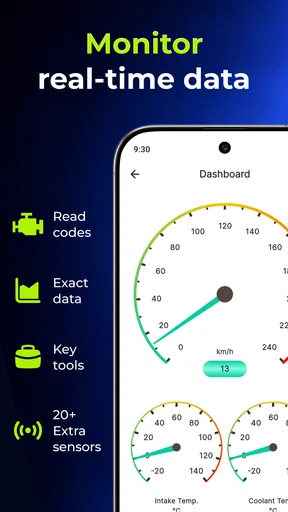
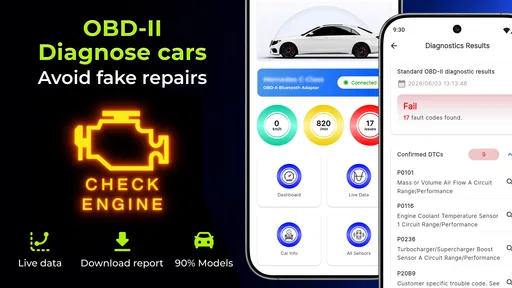
This app is your gateway to understanding what's happening under the hood. It's like peeling back the layers of mystery shrouding your engine. Once you've paired it with an ELM327 Bluetooth adapter, the app instantly connects with your car’s on-board diagnostic system. This is where the magic happens. You get real-time data, fault codes, and even the ability to clear those codes—no more trips to the mechanic for minor issues.
User Interface and Experience
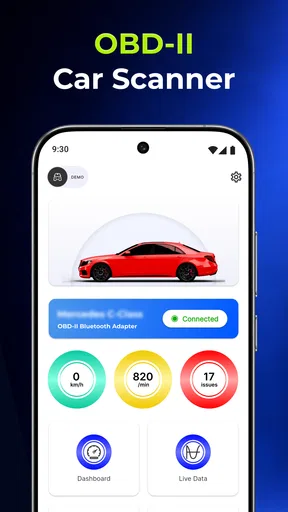
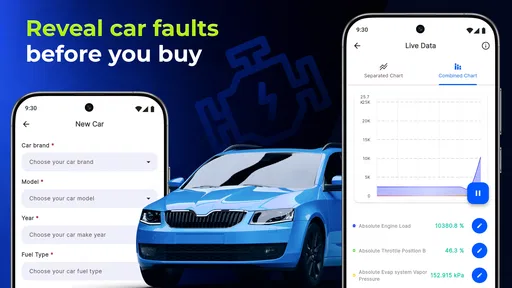
Upon launching the app, the interface is refreshingly straightforward. It doesn’t bombard you with technical jargon, which is a relief if you're not exactly a car enthusiast. The dashboards are customizable, so you can tailor the display to show the metrics you care about most. RPM, speed, coolant temperature—you name it, you can monitor it.
What I appreciate is the user-friendly design. Navigating through the app feels intuitive, and you’re not left scratching your head trying to figure out what to do next. With clear icons and a smooth layout, it’s accessible for anyone, from the seasoned car geek to someone who just wants to avoid a hefty mechanic bill.
Features That Stand Out
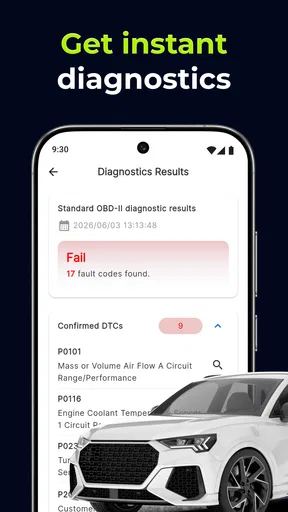
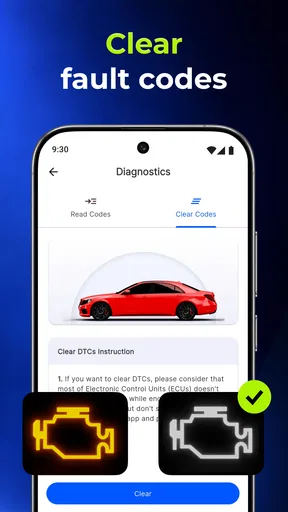
One of the standout features is the ability to read and clear diagnostic trouble codes (DTCs). This means you can find out why that dreaded check engine light is on and potentially fix it yourself. The app provides detailed information about each code and possible solutions, which is super handy.
Another nifty feature is the real-time data analytics. The app can display graphs and charts in real-time, giving you a clear picture of your car’s performance. It’s like having a dashboard on steroids.
For those who love a bit of customization, the app allows you to create custom dashboards. If you’re someone who likes to keep tabs on specific data, this feature is a godsend.
Reading codes without jumping to conclusions
In everyday use, the most helpful workflow is to read a code, note it down, and look at the surrounding symptoms before deciding whether to clear it. A code can point toward a system or condition; it does not always identify the exact failed part. I would use the app to arrive at a better question for a repair shop, not to order a replacement component based on one result.
For example, if a warning light comes on during a normal drive, I would park safely, connect the adapter, and record the code and any relevant live readings. I would then compare that information with what the car is doing—whether it feels unusual, runs roughly, or behaves normally—and keep the code available when contacting a mechanic. This small handoff makes the conversation more informed without pretending that a phone app has completed a full inspection.
Clearing a code is most useful after the underlying issue has been addressed or when a knowledgeable person has decided that clearing it is appropriate. Clearing it just to make the warning disappear can remove a useful clue, and it does not repair the cause. If a warning returns, or the vehicle feels unsafe, I would stop experimenting and get qualified help rather than treating a cleared display as proof that the car is fixed.
Compatibility and Connectivity
Now, let’s talk about compatibility. The OBD2 Car Scanner - ELM Torque app works seamlessly with most OBD2 compliant vehicles. This includes a wide range of makes and models, which is a huge plus. Pairing with an ELM327 adapter is straightforward. Just plug the adapter into your car’s OBD2 port, pair it with your phone via Bluetooth, and you’re good to go.
Connectivity is generally stable, but like with any Bluetooth device, it can occasionally drop. However, in my experience, reconnecting is a breeze and doesn’t disrupt the flow of data for too long.
What the adapter and car determine
Compatibility is not only about the app. The vehicle, adapter, phone, and Bluetooth connection all play a part, and an OBD2 connection should not be confused with access to every system in every car. A basic diagnostic setup is best approached as a way to inspect supported engine-related information. If you need brand-specific functions, a professional scan, or checks beyond what a general adapter can expose, a workshop tool or a manufacturer-focused option may be a better fit.
When choosing an adapter, I would prioritize a device that clearly states compatibility with the phone and vehicle rather than choosing solely by the ELM327 label. If the app connects but offers fewer readings than expected, that can reflect the car’s supported data or the adapter, not necessarily a fault in the app. Keeping the setup simple—one phone, one adapter, and the parked car—also makes it easier to identify where a connection problem is coming from.
Where it fits among the alternatives
Compared with a basic code reader, the app-and-adapter approach can be more flexible: you use a phone screen, can view live information, and can arrange selected readings on a custom dashboard. A standalone reader may be the more dependable choice for someone who wants a dedicated tool and does not want to pair devices or manage Bluetooth. A repair shop’s diagnostic equipment is the better option when the issue calls for deeper testing, specialist functions, or a professional interpretation.
That trade-off is why I would recommend this setup most to curious owners who are comfortable with a modest amount of troubleshooting. It is also useful for someone buying into home maintenance who wants to understand a warning before making a call. It is less suitable for drivers who expect the app alone to identify a definite repair, or who need a guaranteed diagnostic result without checking adapter and vehicle compatibility.
Why You Might Love It
If you’re someone who loves to be in control of your car’s health, this app is definitely for you. It empowers you to diagnose and understand issues without the need for costly diagnostic tools. Plus, you get to learn about your vehicle's performance in a way that’s both engaging and educational.
For the environmentally conscious, keeping tabs on your car’s performance can help you drive more efficiently, potentially saving on fuel and reducing your carbon footprint.
There is a practical learning benefit here, too: choosing only a few readings that answer a real question is usually more useful than filling every dashboard space. I would start with the values relevant to the concern at hand, then add others only when I know what they help me understand. That keeps live data from becoming a wall of numbers and makes it easier to notice a meaningful change.
The app is free to install, while it also offers in-app purchases priced from $0.99 to $99.99 per item. I would check the purchase details in the app before paying for anything and decide whether the extra option addresses a need I actually have. Drivers who only want an occasional code check may be better off starting with the basic setup and seeing whether it suits their routine.
From a warning light to a useful next step
Imagine the check engine light appears on the way home, but the car still seems to be running normally. Once parked, you connect the adapter and read the fault code. Rather than clearing it immediately, you save the result, review the app’s explanation, and make a note of when the light appeared and how the car felt. You now have a more focused starting point for deciding whether to book a diagnosis, monitor the issue, or ask a mechanic a specific question.
That is a realistic win for this kind of tool: it can reduce guesswork and help you communicate, even when it cannot settle the repair decision by itself. If the car is behaving dangerously, a warning is accompanied by serious symptoms, or the code is unclear, the sensible outcome is not more app exploration; it is to stop driving when appropriate and seek professional advice.
Final Thoughts
All in all, the OBD2 Car Scanner - ELM Torque app is a must-have for anyone who wants to take charge of their vehicle’s health. It’s like having a personal mechanic on standby, ready to assist at a moment’s notice. Whether you’re a car enthusiast or just someone who wants to save a few bucks on diagnostics, this app offers immense value.
So, if you’re tired of being left in the dark about your car’s issues and want to take control, give this app a whirl. Who knows? You might just find yourself enjoying a new hobby in car diagnostics!
Privacy and Permissions
See what permissions an app requests and how it handles your data.
- Location
- approximate location (network-based), precise location (GPS and network-based)
- Photos/Media/Files
- read the contents of your USB storage, modify or delete the contents of your USB storage
- Storage
- read the contents of your USB storage, modify or delete the contents of your USB storage
- Wi-Fi connection information
- view Wi-Fi connections
- Other
- view network connections, pair with Bluetooth devices, access Bluetooth settings, full network access, draw over other apps, control vibration, prevent device from sleeping, Google Play license check
Verdict
Strengths of OBD2 Car Scanner - ELM Torque
- User-friendly interface for easy navigation.
- Real-time data tracking and diagnostics.
- Wide compatibility with various car models.
- Customizable dashboard for personalized use.
- Comprehensive error code database.
Limitations of OBD2 Car Scanner - ELM Torque
- Requires a separate OBD2 adapter.
- Some features need a premium subscription.
- Limited support for older car models.
- Occasional connection issues with Bluetooth.
- Interface may be overwhelming for beginners.
Other Releases by Cards
View All
Cards - Mobile Wallet
Productivity4.6

Drawing Pad Lite - Artbook
Art & Design4.5

Phone Mirror app - True Mirror
Beauty4.6

Ghost Detector Pro Radar
Entertainment4.6
Similar Picks in This Category
View All
Android Auto
Google LLC4.1

maxim — order a taxi & food
PT. SITO4.7

Штрафы ГИБДД: проверка с фото
Pays LLC – Штрафы ГИБДД4.7

Номерограм – проверка авто
Авто Ассист4.8

Дром Авто
Дром4.9

Frequently Asked Questions
What is the primary function of the OBD2 Car Scanner - ELM Torque app?
The OBD2 Car Scanner - ELM Torque app is designed to help users diagnose and monitor their vehicle's performance. By connecting to your car's OBD2 system, it provides real-time data on engine diagnostics, fuel consumption, and other critical metrics. This information is essential for both casual drivers and car enthusiasts looking to maintain their vehicles efficiently.
Is the OBD2 Car Scanner - ELM Torque app compatible with all vehicles?
While the OBD2 Car Scanner - ELM Torque app is compatible with most vehicles manufactured after 1996, compatibility can vary based on the car's make and model. It’s advisable to check if your vehicle supports OBD2 protocols. Additionally, you'll need an ELM327 Bluetooth adapter to connect your smartphone to the car's OBD2 port.
What features does the OBD2 Car Scanner - ELM Torque app offer?
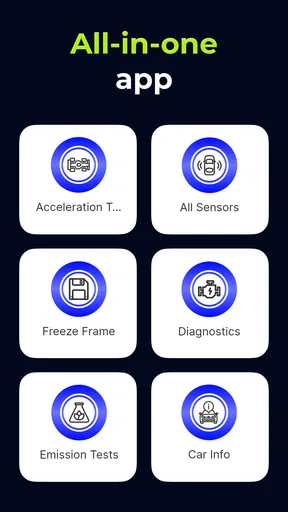
The app offers a wide range of features including real-time data display, fault code reading and clearing, performance tracking, and fuel economy analysis. It also supports customizable dashboards and can log driving data for later analysis. These features make it a comprehensive tool for understanding and optimizing vehicle performance.
Are there any costs associated with using the OBD2 Car Scanner - ELM Torque app?
The app might be available in both free and premium versions. The free version typically offers basic features, while the premium version unlocks more advanced diagnostic tools and customization options. It's worth checking the app store for the latest pricing details to decide which version suits your needs best.
How user-friendly is the OBD2 Car Scanner - ELM Torque app for beginners?
The app is designed with an intuitive interface, making it relatively easy for beginners to navigate. It provides clear instructions and tutorials on setting up and using the app effectively. However, some understanding of vehicle diagnostics can enhance the user experience, particularly when interpreting the data provided by the app.
